
Nextcloud • NGOs • Remote Teams • Video Review • GDPR-minded workflow
GDPR video workflow for NGOs: A Calm, GDPR-Minded Approval System (9 proven Steps)
Teaser: A practical Nextcloud video review workflow for NGOs: upload-only intake, review exports with time-coded feedback, clear approvals, sensible retention, and fewer places where things can go wrong. Built for remote teams, volunteers, and unstable internet This GDPR video workflow for NGOs is built to keep handover, feedback, and approvals calm, traceable, and safe.
Why this matters (in plain terms)
If your footage, feedback, and approvals live in five different places, your project is fragile. “Calm” means fewer tools, fewer links, clearer decisions, and less accidental oversharing.
GDPR video workflow for NGOs: what “calm” looks like in practice.
Most NGO video projects do not break because the edit is hard. They break because the project has no single home. Footage arrives in random links. Feedback gets buried in chats. Approvals become implied. Then the team ships late, ships messy, or ships something that should never have been published.
A calm workflow solves two things at once:
- It makes delivery easier.
- It makes decisions traceable, including what was approved, by whom, and what you keep or delete.
GDPR is not a checklist at the end. It is workflow design from the start, especially around data minimisation and storage limitation. (This post is practical workflow guidance, not legal advice.)
What “calm” looks like (five rules)
The point of a GDPR video workflow for NGOs is not more process, but fewer places where mistakes happen.- One source of truth: one project space where the current version lives.
- Upload is not access: contributors can deliver files without browsing the project.
- Review happens on exports, not raw footage: reviewers see only what they need to decide.
- Feedback is time-coded and structured: short, actionable, easy to close.
- Retention is decided on purpose: keep or delete intentionally, not by accident.
If you are fighting a “SaaS zoo”
This workflow pairs well with this post: Your SaaS Zoo Is Eating Your Time. Same problem, different angle.
Two real-world scenes: what goes wrong and how this workflow prevents it
Scene 1: The field upload that accidentally exposes someone
A volunteer uploads clips from a shelter visit. In one background moment, a face appears that should not be published. The clip gets forwarded as a public link “so the team can review quickly.”
What breaks: uncontrolled access, unclear responsibility, no privacy pass.
Calm fix:
- Field teams upload via File Drop (upload-only). They do not share public links.
- Editors create a review export that excludes raw footage and sensitive outtakes.
- Reviewers approve the export only, after a short privacy-pass checklist.
- The decision is logged (who approved, what scope, what was removed).
Scene 2: “Looks good” is not an approval
Two stakeholders reply in chat: “Looks good.” Nobody knows if that included privacy concerns or only storytelling.
What breaks: approval ambiguity, future accountability problems.
Calm fix:
- One approval log entry per version: APPROVED v03, name, date, distribution scope.
- Two approvals max: Editorial and Privacy/Safety.
- Everything else stays as comments, not approvals.
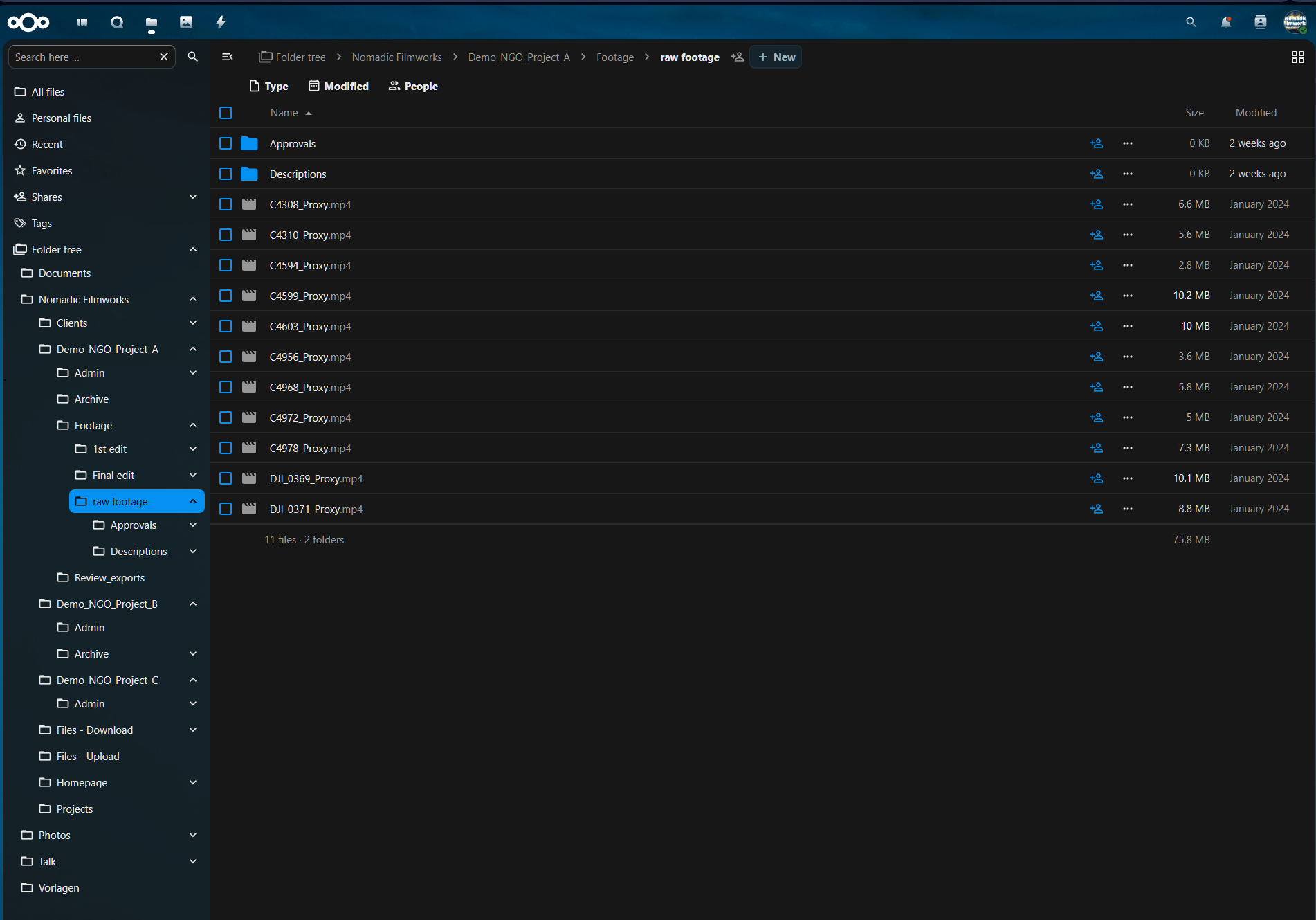
Step 1: Create a project skeleton (folder template that scales)
Create one project folder per production. Keep it boring. Boring scales.
Folder structure
- 00_ADMIN (brief, permissions, releases, approvals)
- 10_INTAKE_UPLOADS (upload-only intake)
- 20_FOOTAGE_RAW (restricted)
- 30_AUDIO (VO, music, licenses)
- 40_EDIT_PROJECT (project files, proxies, graphics)
- 50_REVIEW_EXPORTS (review MP4 only)
- 60_FEEDBACK_LOG (one canonical log)
- 70_FINALS_DELIVERED (masters + deliverables)
- 90_ARCHIVE_OR_DELETE (what you keep, what you purge)
Step 2: Set roles once (role cards, not legal theory)
You do not need a legal essay in your daily workflow. You need clarity about who can do what.
- Uploader (Volunteer / Field team)
Access: upload-only to 10_INTAKE_UPLOADS
Responsibility: deliver material, basic naming - Editor (Internal or external)
Access: full project access, including raw
Responsibility: selects, edit, review exports, redaction - Reviewer (Comms lead / Program lead)
Access: 50_REVIEW_EXPORTS + 60_FEEDBACK_LOG
Responsibility: content accuracy, messaging, factual notes - Approver (Accountable decision maker)
Access: review exports + approval log
Responsibility: final editorial sign-off plus privacy and safety sign-off - Archivist (Optional)
Access: archive/delete folders
Responsibility: retention, cleanup, closing the project
If you work with external editors, document responsibilities and boundaries in writing. Keep it operational: who shares links, who approves, who decides retention.
Step 3: Intake without oversharing (Nextcloud File Drop)
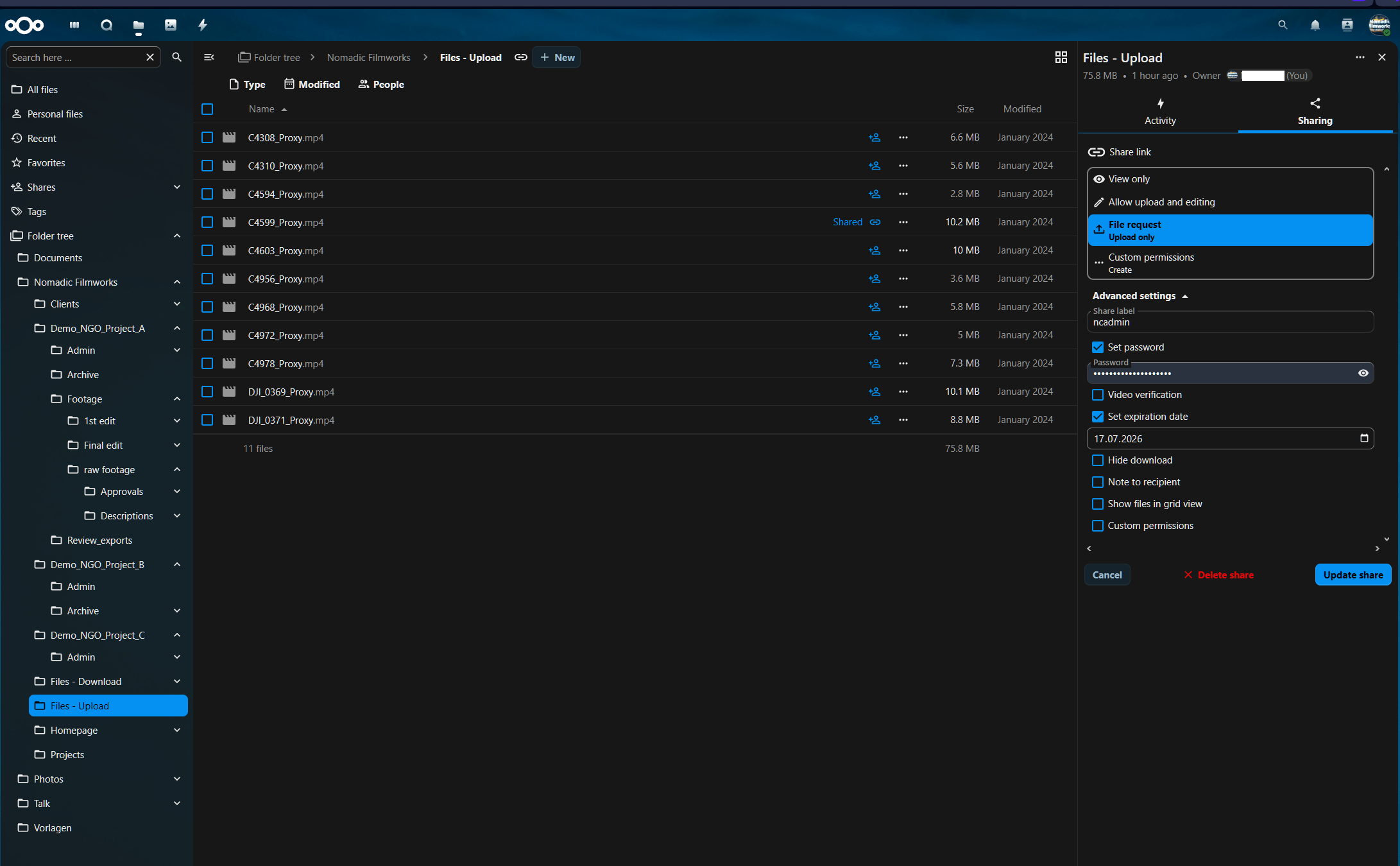
This is the biggest practical win for NGOs: contributors can deliver footage without gaining access to your project space.
Nextcloud setup: File Drop in 3 minutes
- Go to 10_INTAKE_UPLOADS
- Click Share
- Create a public share link
- Set File drop (upload only)
- Set a Password
- Set a short Expiration date
- Send the link to uploaders
Step 4: Default sharing rules that prevent link sprawl
Where possible, enforce safe defaults so teams do not have to remember them under pressure:
- Require passwords for public shares
- Set default expiration for public shares
- Limit resharing for sensitive projects
This reduces uncontrolled access paths without adding more work.
Step 5: Review exports (the safest way to get approvals quickly)
Do not ask reviewers to open raw footage. Most will not, and they should not have to. Review should happen on a controlled export. In this GDPR video workflow for NGOs, stakeholders review exports, not raw footage, to avoid oversharing.
- Editor exports one MP4 to 50_REVIEW_EXPORTS
- Naming: ProjectName_Review_v03_2026-01-03.mp4
- Export is easy to watch (clean-enough audio, stable viewing quality)
- Optional: visible timecode burn-in if your team struggles with timecodes
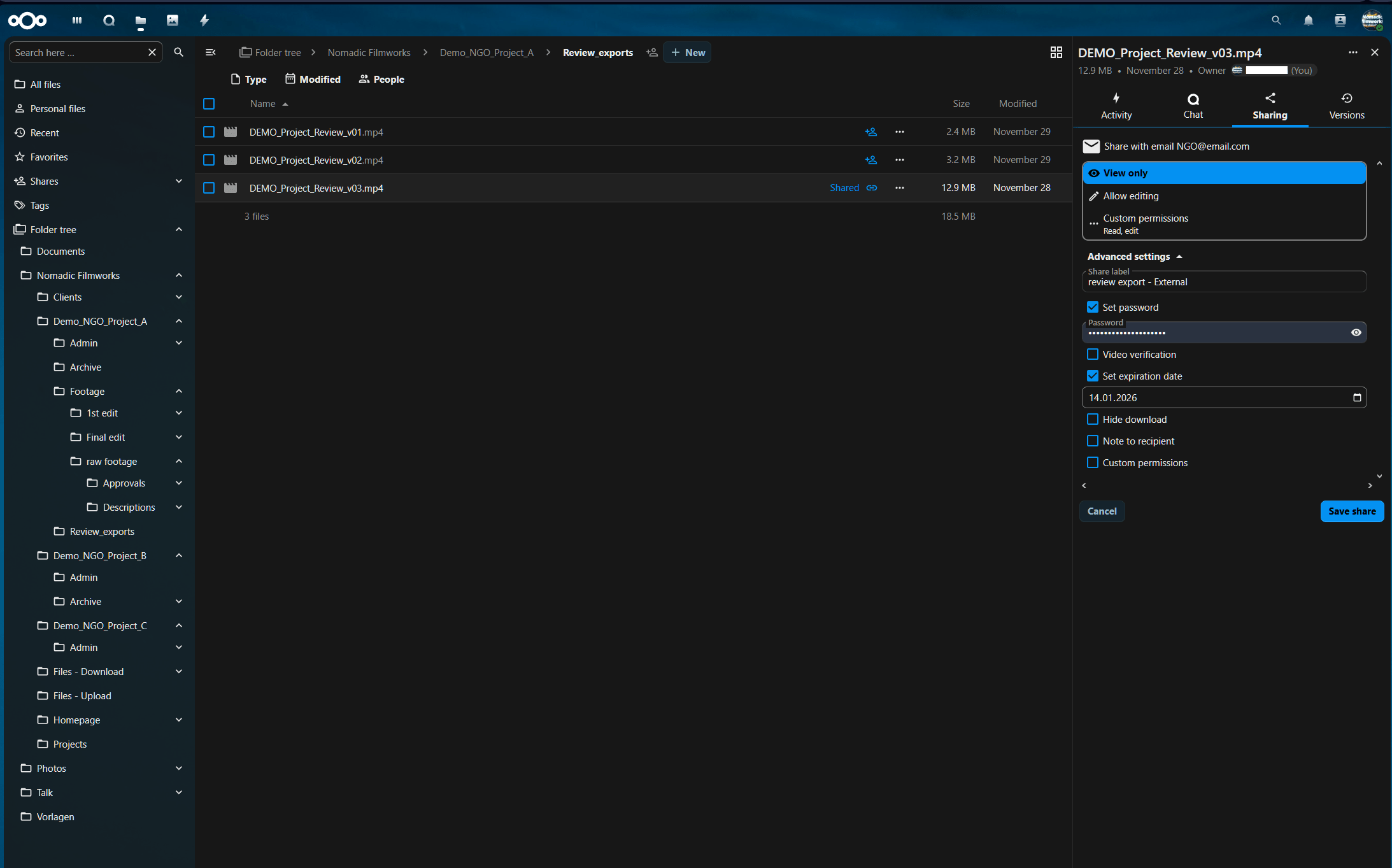
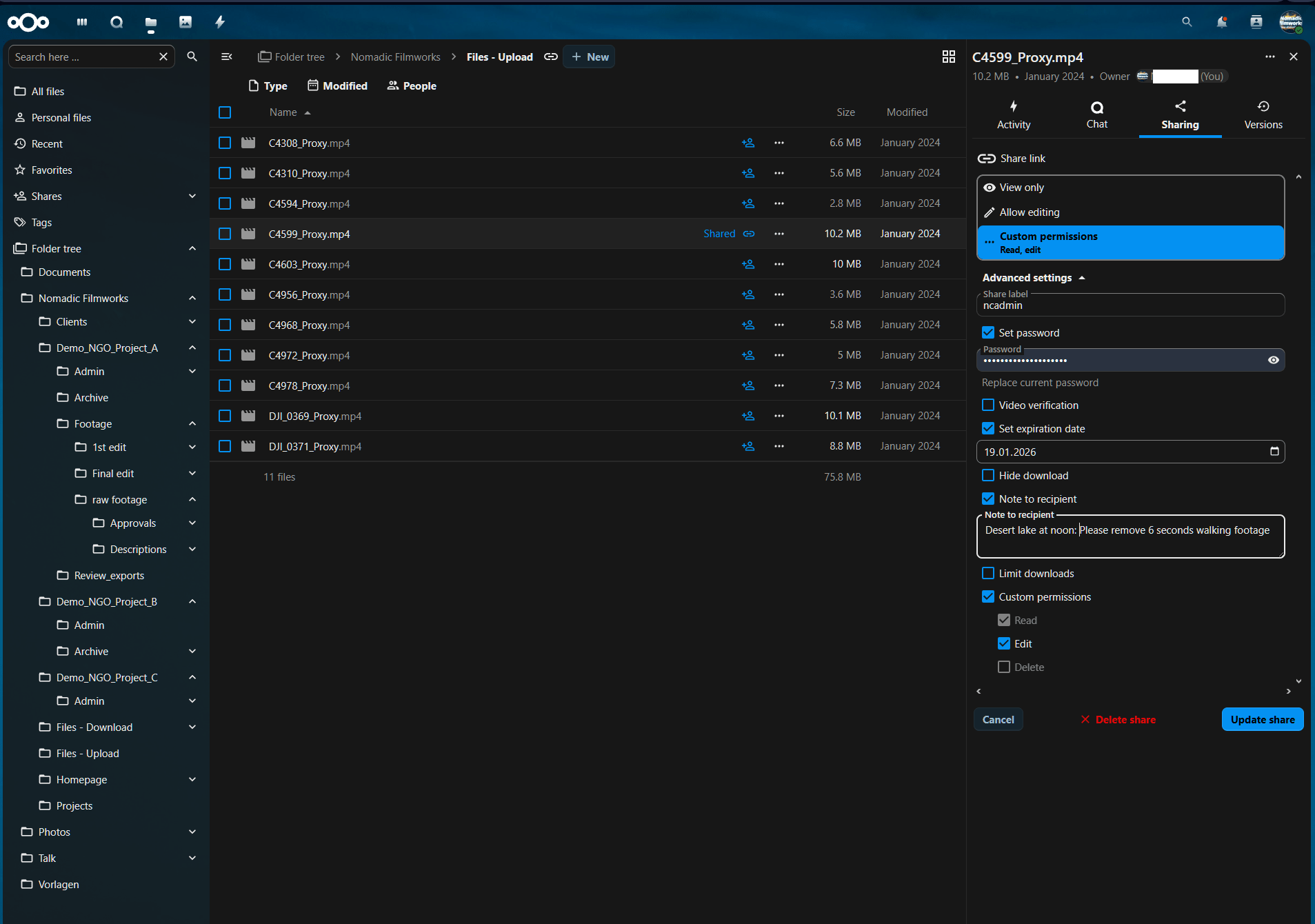
Now share the export with controlled access (view-only, password, expiration). Add a short note so the review request stays attached to the asset.
Step 6: Time-coded feedback that humans actually use
Nextcloud comments are good enough if you keep the format simple and consistent.
Feedback format (copy/paste)
mm:ss + severity (Must / Should / Nice)
one sentence: what is wrong
one sentence: what “done” looks like
optional tag: privacy, safety, accuracy, audio, subtitles
Examples
- 01:12 Must (privacy) Blur the child in the background. Done when the face is not identifiable at normal playback.
- 02:40 Should (audio) Lower music by 3 to 4 dB under the interview line. Done when speech is effortless to follow.
- 03:05 Nice (story) Replace drone shot with the closer angle for continuity.
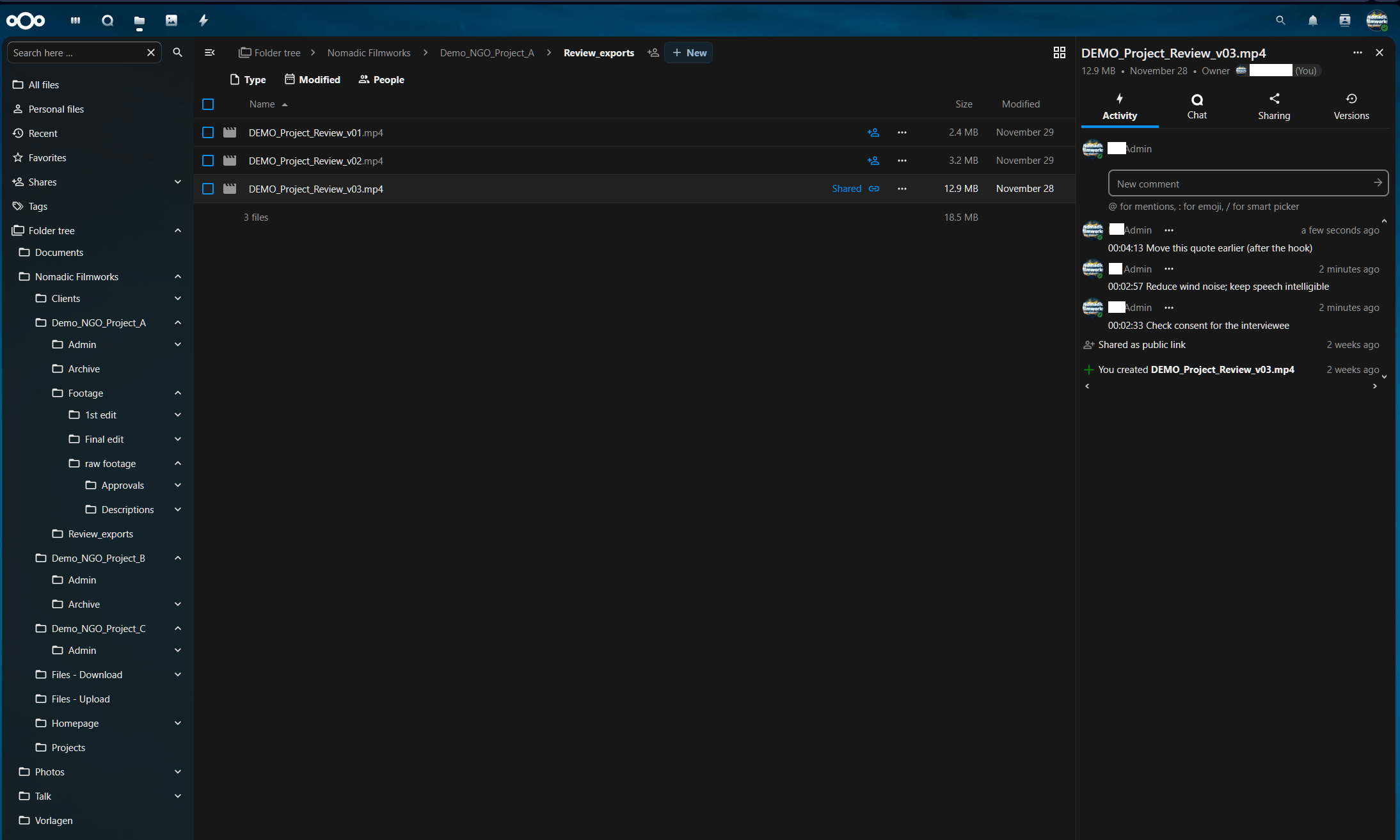
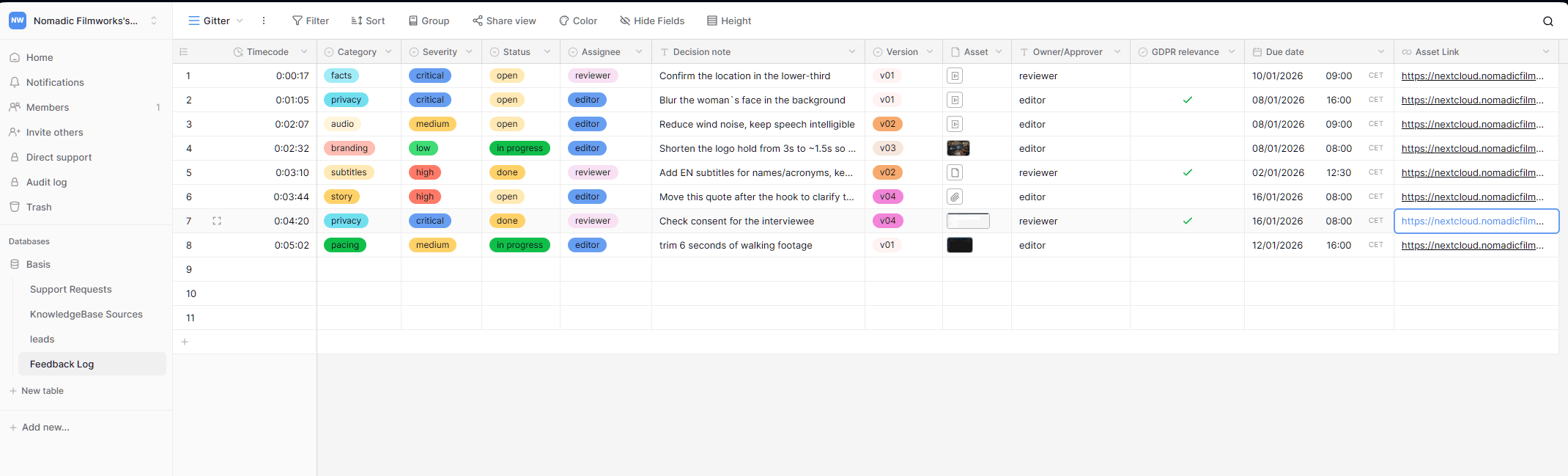
If you need a stronger audit trail and clearer ownership, log review items in Baserow (or an equivalent system). This turns comments into trackable work.
Recommended fields for a feedback log: timecode, category, severity, status, assignee, decision note, version, GDPR relevance, due date, asset link.
Step 6b: Versioning (prevent feedback on the wrong file)
Versioning is how you keep reviews defensible: what is current versus what was shared before. It reduces confusion and helps teams answer “what changed?” quickly.

Step 7: Approvals that are unambiguous (two-step is enough)
Keep approvals minimal and explicit.
- Editorial approval: “This cut is accurate and matches the message.”
- Privacy and safety approval: “Consent and risk checks are satisfied for the agreed distribution scope.”
Approval log format (copy/paste)
Version approved: v03
Approved by: name, role
Date:
Distribution scope: website, social, internal, paid ads (yes/no)
Notes: what was removed or blurred (if relevant)
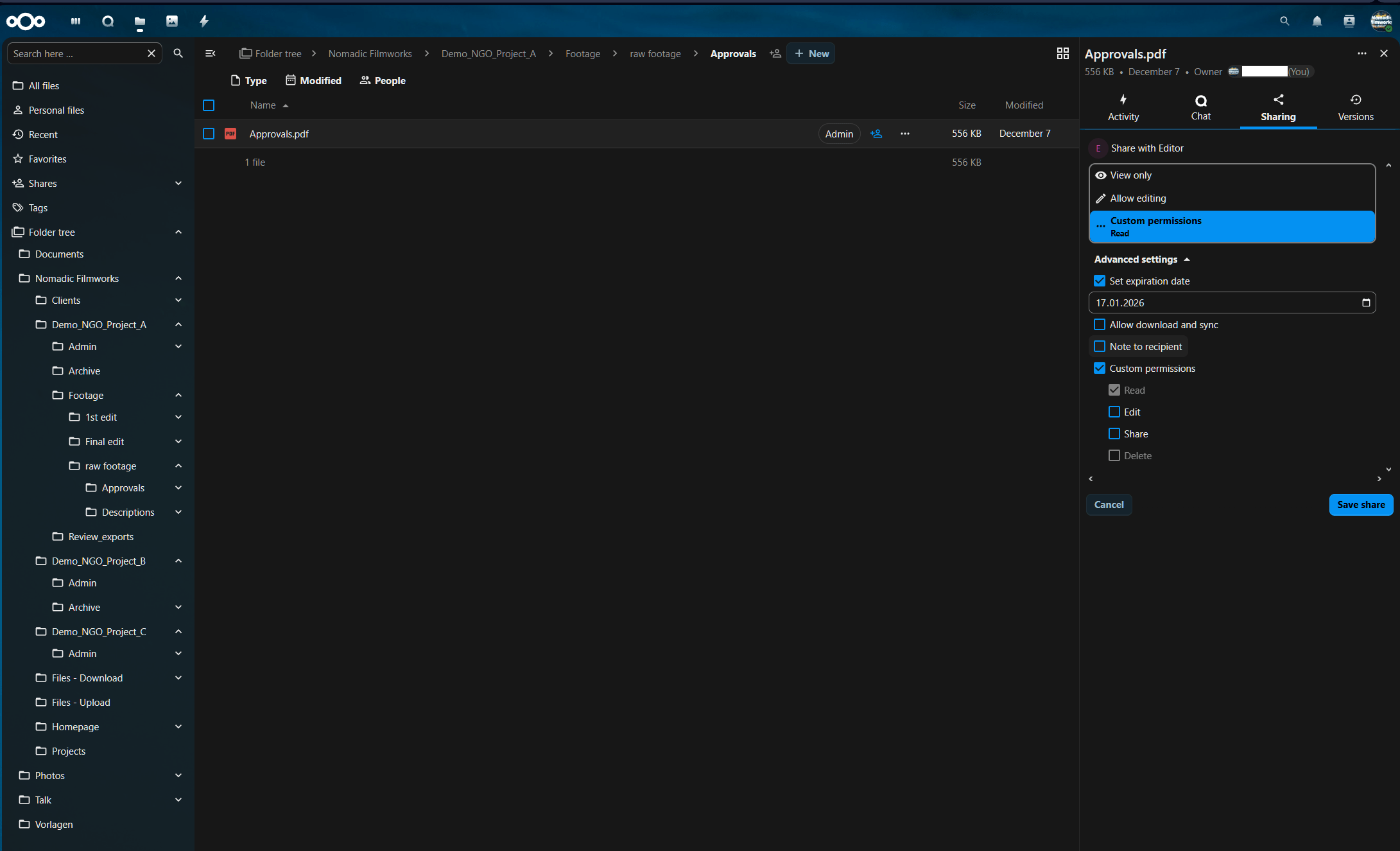
Store approvals centrally and share them with granular permissions. This prevents “approval by screenshot” and creates a clean record.
Step 8: Sensible retention (a practical model, not legal advice)
Many teams keep everything forever because deleting feels risky. In practice, that is how risk accumulates. A GDPR video workflow for NGOs only works if retention is decided upfront and executed at the end. A practical retention model should follow necessity and risk:
- Low risk (no identifiable people, landscapes, public events): keep raw longer; keep finals as needed
- Medium risk (identifiable adults with clear consent): keep raw shorter; keep finals per comms policy
- High risk (minors, shelters, protected locations, vulnerable groups): keep raw only as long as necessary for delivery, then delete; keep finals only if consent and risk review support the agreed distribution scope
Step 9: n8n automations that save time without adding chaos
Automation should remove repetitive work, not create magic nobody understands.
Good first automations
- When a Baserow “Project” row is created, create the folder skeleton in Nextcloud
- When a file lands in 50_REVIEW_EXPORTS, notify reviewers and start a review deadline timer
- If no approval after X days, send a reminder
- If files are tagged for deletion, send a warning before retention runs
The Calm Ruleset (print this)
- Uploaders upload only. They do not share links.
- Reviewers review exports only, not raw footage.
- Feedback is time-coded and structured.
- Approval is a recorded decision, not a chat reaction.
- Retention is decided at the start and executed at the end.
Disclaimer
This post shares practical workflow patterns and is not legal advice. If your work involves minors, vulnerable people, shelters, medical contexts, or protection-sensitive locations, coordinate with your DPO or legal counsel and document your decisions.
If you want the templates
If you want my folder skeleton, a Baserow feedback log template, and a one-page approval checklist, email me at info@nomadicfilmworks.com. Tell me your team size and where footage and feedback currently live. I will reply with a short implementation plan.
FAQ
Do reviewers need access to raw footage?
No. Reviewers should only see a versioned MP4 in Review Exports. Raw footage stays restricted to the editor team.
What counts as a real approval?
A named decision per version (e.g., “APPROVED v03”), with date and distribution scope. Not a chat message.
How do volunteers upload safely from the field?
Use Nextcloud File Drop (upload-only) with a password and a short expiration date. No browsing, no link sprawl.
How do we keep feedback usable (and not endless)?
Timestamp + severity + one sentence change request + “done when …”. Keep it short and closeable.
How long should we keep sensitive footage?
Keep high-risk material only as long as needed to deliver the approved final. Decide retention upfront and execute cleanup at the end.
Related reading:
Your SaaS zoo is eating your time,
GDPR video workflow for NGOs,
Privacy-first infrastructure for NGOs.
External Links: