DaVinci Resolve Automation Workflow for faster video production.
The DaVinci Resolve automation workflow behind Nomadic Video Automation is a self-hosted production system that prepares transcripts, captions, markers, local AI analysis, review states, render quality checks and archive records before the editor starts the creative cut.
The avatar is synthetic and disclosed openly. It is part of how I think about video avatars and interfaces: useful when they make knowledge easier to access, never when they hide what is real. The workflow, DaVinci Resolve integration, local analysis layer, reports and infrastructure shown in the video are real.
“The edit does not start when the timeline opens. It starts with everything that has to be prepared, found, checked, documented and handed over before and after the cut.”
This DaVinci Resolve automation workflow starts exactly there: with the recurring preparation, checking and documentation steps around the actual edit.
Most delays in video post-production do not come from the edit itself.
They come from everything around it: checking files, preparing transcripts and captions, searching for usable moments, collecting review notes, rendering versions, checking outputs and keeping track of where each file ended up. None of that is the creative core. But when it is chaotic, the whole video production workflow becomes slower and harder to trust.
- 01Before the creative work starts, editors lose time on file preparation, transcripts, captions and DaVinci Resolve timeline setup.
- 02Strong moments, weak scenes and technical issues are found manually, often after momentum is already gone.
- 03Review decisions, versions and production notes get scattered across chats, emails and loose documents.
- 04Renders, quality checks and archive states become hard to trust because the process was never documented clearly.
Video editing, automation, local AI and privacy-first infrastructure in one workflow.
Nomadic Video Automation brings together video post-production, AI-assisted content workflows, custom automation and privacy -first infrastructure in one working production loop.
DaVinci Resolve production
Resolve remains the creative workspace. The workflow prepares media, captions, markers and render handoff around it.
Custom automation
n8n connects recurring steps from upload to archive so repeated production work does not start from scratch every time.
AI-assisted analysis
Local AI can turn transcripts, scenes and technical context into reviewable suggestions, not final decisions.
Controlled infrastructure
Nextcloud and Baserow keep files, reports and production states in a controlled environment instead of spreading them across random tools.
One documented path from raw upload to finished archive.
The workflow covers the practical loop: a video enters Nextcloud, n8n starts the job, Baserow records the state, DaVinci Resolve receives the material, local processing prepares transcripts, captions and analysis, and the final output is rendered, checked, uploaded and archived.
Raw video enters a controlled input folder.
The automation detects the file and creates a job.
Resolve receives the media and timeline structure.
Speech and caption foundations are prepared locally.
Creative, technical and quality context is documented.
Useful notes can become markers inside Resolve.
A human approves, rejects or requests changes.
Resolve exports and output metadata is checked.
The final render is uploaded back to Nextcloud.
Raw and finished files move into structured archive locations.
A cleaner starting point before the real edit begins.
This is not an AI editor. It is production preparation. The system gives the editor structured material, searchable context and documented suggestions, so the human can make better decisions with less repetitive setup work.
Prepared Resolve timeline
Media, editable captions and marker context can be prepared before the editor starts shaping the story.
Local transcript
Speech is transcribed locally so spoken content becomes searchable and easier to review.
Editable captions
Caption foundations can be prepared early instead of becoming a late manual production task.
Marker suggestions
Strong moments, weaker areas and review notes can appear as useful markers inside Resolve.
Creative analysis
Story flow, hook potential, caution areas and possible structure points are documented for human review.
Audio quality context
Loudness, silence and audio risk notes are recorded so technical review is less dependent on memory.
Motion graphics notes
Suggestions show where text, visuals or simple graphics could support the edit instead of decorating it.
Export and archive record
Render metadata, output location and archive state remain visible after the edit is done.
The output is not just files. It is clarity.
A finished video is useful. A finished video with traceable context is safer to hand over, review, improve and archive. Nomadic Video Automation records what happened, what was found, what was rendered, where the result lives and what still needs human judgement.
Creative direction brief
A structured first pass on story flow, usable moments, weaker areas and possible edit direction.
Audio quality report
A practical record of loudness, silence, audio risks and delivery context.
Motion graphics direction pack
Notes on where text, visuals or simple graphics could support the edit.
Export and archive record
Render metadata, output path, raw archive state and finished archive state in one traceable record.
Configured around your Resolve setup, not handed over as a random template.
Nomadic Video Automation is implemented as a configured production system. A local worker connects the automation layer with the editing machine and DaVinci Resolve. The server-side tools handle orchestration, file structure, documentation and production state.
The setup is installed around your DaVinci Resolve machine, your file structure and your production process. Where needed, I also configure the supporting privacy-first infrastructure around Nextcloud, n8n and Baserow.
Map your current production process
We identify where time is lost: ingest, transcripts, captions, review, render, quality control, archive or documentation.
Prepare the infrastructure
The workflow is configured around Nextcloud, n8n, Baserow, DaVinci Resolve and the local AI layer needed for your use case.
Install the local worker
The worker is installed on the editing machine so automation can communicate with local files, processing tools and DaVinci Resolve.
Test, document and hand over
The system is tested with real footage, adjusted to your environment and handed over with operating notes and support options.
I install and adapt workflows like this for editors, agencies and content teams.
The starting point is a DaVinci Resolve automation workflow that delivers the minimum useful automation. From there, the system can be extended with render workflows, review gates, archive logic, multilingual subtitles, additional report types and support.
Minimum useful workflow
The core package is built around a working DaVinci Resolve production loop: ingest, local preparation, documentation and a clear editor handoff.
- Workflow assessment and production process mapping
- Nextcloud input/output structure and production folders
- n8n orchestration workflow for the main process
- Baserow production records, status tracking and event logging
- Local worker installation on the editing machine
- DaVinci Resolve timeline preparation and marker handoff
- Local transcript and caption preparation where hardware allows it
- Core Markdown reports saved back into Nextcloud
- Test run with real footage and handover documentation
- Initial stabilization support after installation
Currently offered for DaVinci Resolve workflows only.
The flagship workflow is built, tested and offered around DaVinci Resolve, because that is the editing environment I can bring into a working automated state. I do not currently offer Premiere Pro, Final Cut Pro or other NLE versions. File preparation, documentation and archive logic may be conceptually transferable, but deep timeline, marker, caption and render integration is currently offered for Resolve setups only.
Real outputs from the current DaVinci Resolve automation workflow.
The workflow becomes concrete in the things it produces: a prepared Resolve timeline with captions and markers, a documented Baserow production record and Markdown reports stored in Nextcloud. These are the assets that make the process visible before, during and after the edit.
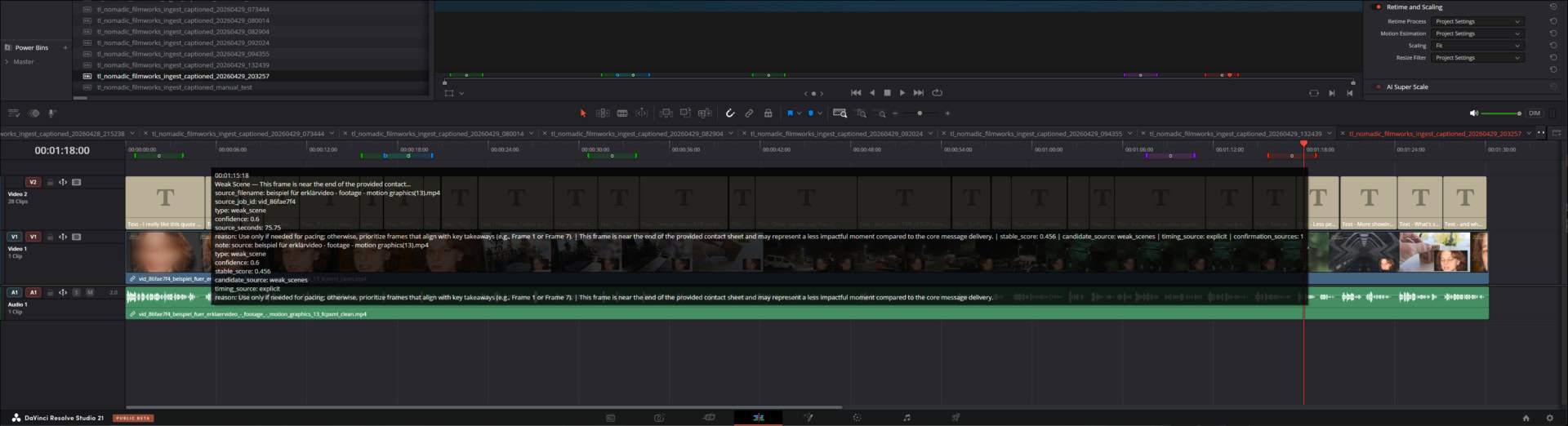
DaVinci Resolve timeline with prepared captions and markers from Nomadic Video Automation
The editor starts with visible structure: editable captions, marker context and prepared material inside DaVinci Resolve instead of an empty timeline and scattered files.
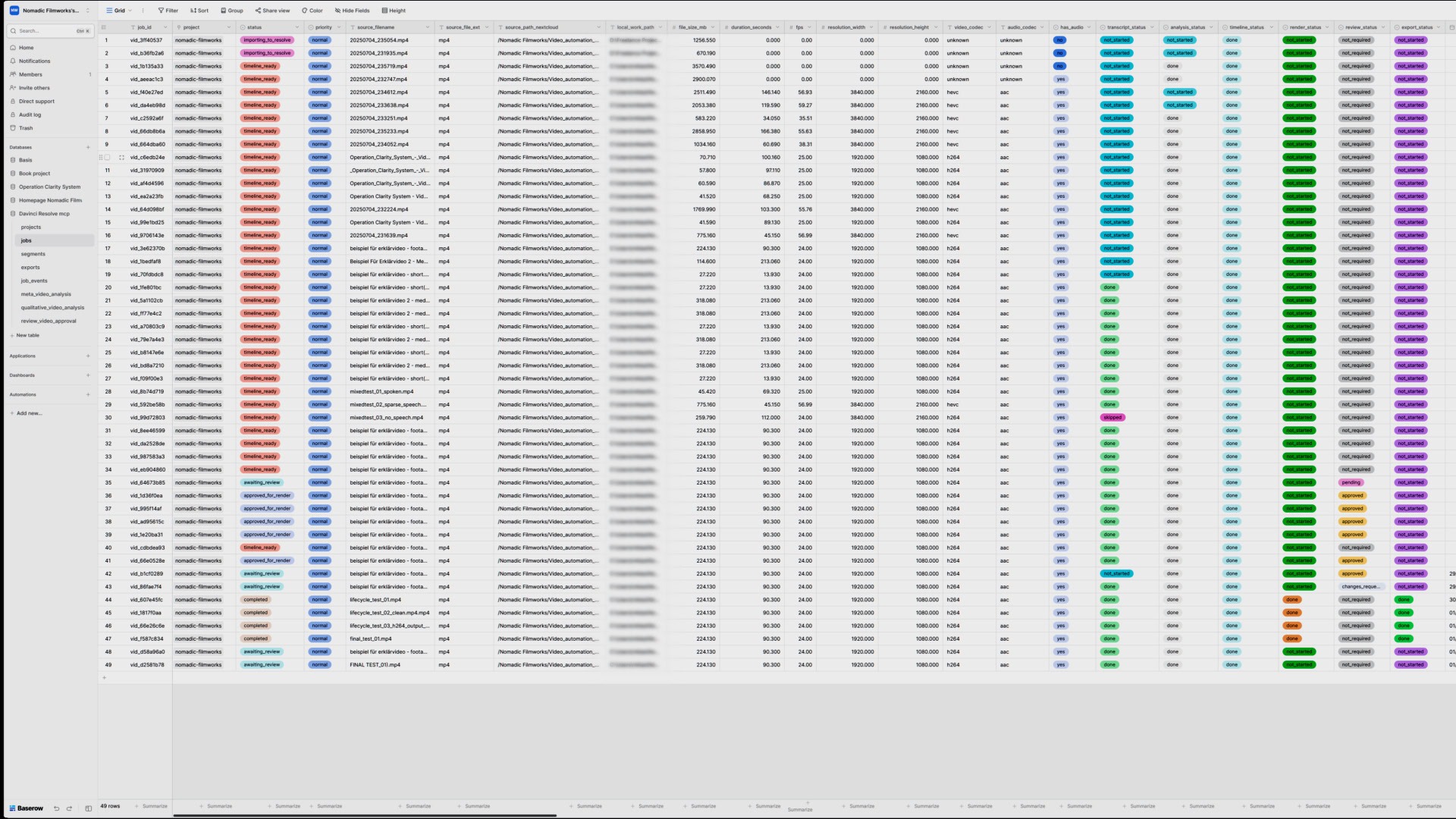
Baserow production record showing video automation job status review export and archive information
Status, review, export and archive information are documented in a structured production record instead of disappearing into memory or chat history.
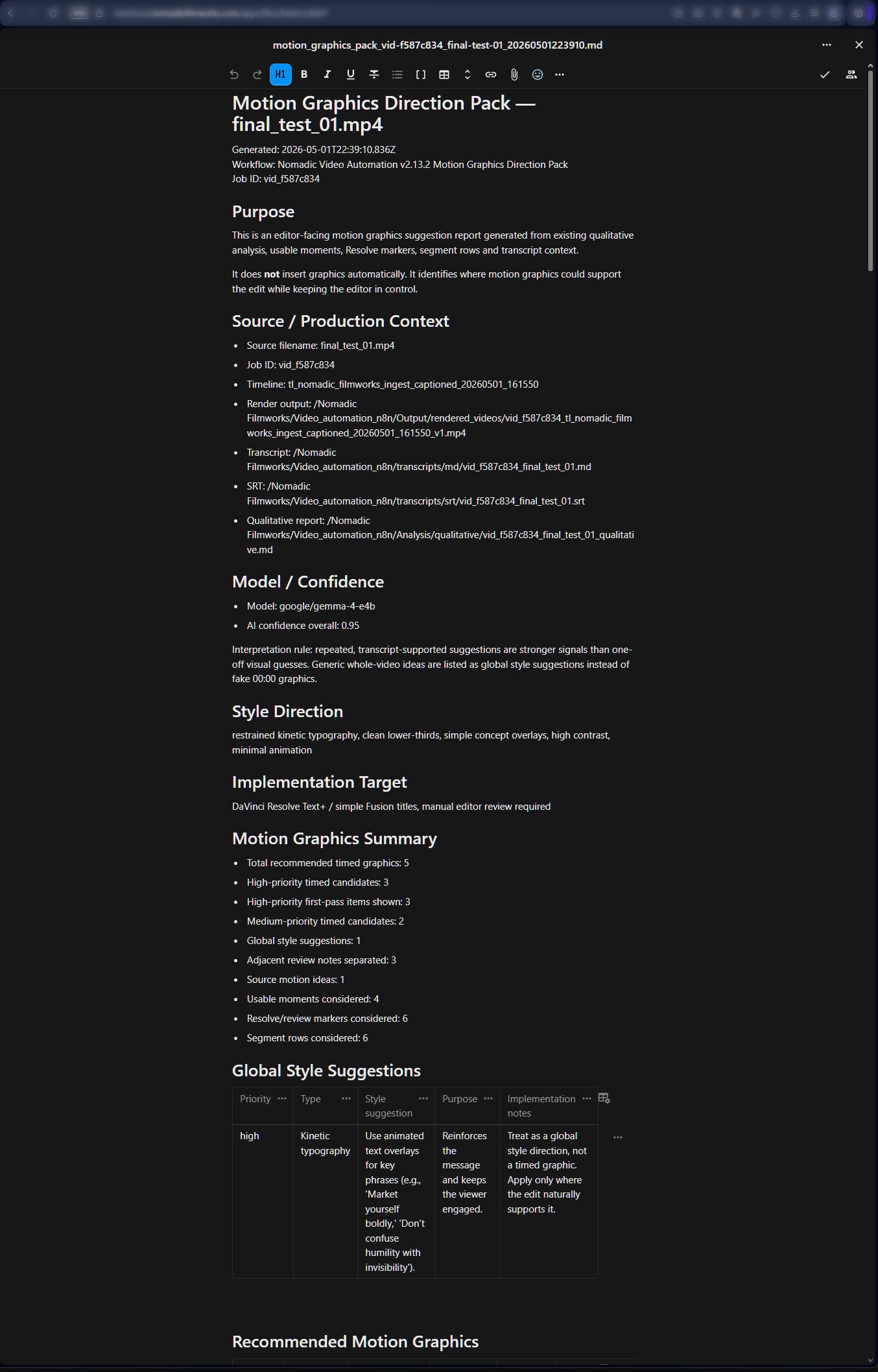
Nextcloud Markdown report generated by local AI analysis for video production workflow
Sidecar documents such as creative briefs, audio quality reports and motion graphics notes stay available in Nextcloud after the edit is finished.
Consistency comes from process, not from AI magic.
The workflow helps create repeatable preparation, documentation and handoff. It does not remove judgement. It makes the production state easier to inspect, repeat and improve.
How quality is kept more consistent
Defined steps, logging, review states, render metadata, reports, archive states and test runs reduce the number of things that depend on memory or improvisation.
What remains human
Pacing, taste, story judgement, emotion, client context and final selection stay with the editor or reviewer. The workflow prepares information; it does not declare the final film.
What it cannot promise
It cannot guarantee a great edit, perfectly detect every strong scene, make bad footage good by itself or replace review. It gives editors a better starting point.
Questions clients should ask before installing a video automation workflow.
A workflow like this should make production calmer, not create another technical burden. These answers keep the scope clear before we talk about an implementation.
Does this only work with DaVinci Resolve?
Yes. This offer is currently for DaVinci Resolve workflows only. DaVinci Resolve is the editing environment I work with and can bring into a functioning automated state. I do not currently offer Premiere Pro, Final Cut Pro or other NLE versions.
Do I need DaVinci Resolve Studio?
For the full workflow, DaVinci Resolve Studio is the safer assumption because scripting, timeline work and render automation need a reliable Resolve setup. The exact minimum requirements are checked during the workflow assessment before implementation starts.
Is this an AI editor?
No. The workflow does not replace the editor and does not make final creative decisions. It prepares material, transcripts, captions, markers, reports and review context so the editor starts from a clearer position.
Can I download this as a ZIP file and run it myself?
Not responsibly. A packaged local worker can be part of the installation, but the full workflow needs configuration: local paths, Resolve scripting, credentials, Nextcloud folders, n8n workflows, Baserow records, local AI models, security settings and test runs.
What does the local worker do?
The local worker connects the automation system with the editing machine. It can fetch files, prepare local media, communicate with DaVinci Resolve, trigger timeline or render actions, run local processing steps and send results back into the workflow.
Do I need my own server?
In many cases, yes — or at least a managed server environment configured for the workflow. The cleanest setup uses controlled infrastructure for files, automation and records. The right setup depends on your material, team size, privacy requirements and expected workload.
If you do not have that infrastructure yet, this does not have to stop the project. I have developed a dedicated offer for this and can help you set up a suitable privacy-first server stack with Nextcloud, n8n, Baserow and the workflow foundations needed around it. You do not have to learn how to set up servers, access control and automation services first; the stack can be prepared and documented around the video automation workflow.
Where does the local AI run?
Depending on the setup, local AI can run on the editing machine, a dedicated workstation or another controlled machine with enough performance. The practical choice depends on footage length, transcription workload, model size, hardware and expected speed.
What is included in the core implementation?
The core implementation focuses on the minimum useful workflow: structured upload, ingest, local worker setup, DaVinci Resolve handoff, local transcription, caption preparation, basic local AI analysis, production records and a tested handover. Add-ons can extend this with render workflows, review gates, archive logic, subtitle translation, extra report types and maintenance.
What makes the workflow useful for editors?
It reduces repetitive preparation work. Instead of starting with scattered files, missing transcripts and empty timelines, the editor receives structured material: transcripts, captions, markers, review notes, technical context and production documents.
How does it help maintain consistent quality?
Consistency comes from repeatable process, not from AI magic. The workflow uses defined steps, job records, Markdown reports, quality-control metadata, render documentation, archive states and review gates. Human review still matters, but fewer steps depend on memory, improvisation or scattered notes.
What can this workflow not do?
It cannot guarantee a great edit, replace taste, understand every client context or perfectly identify every strong or weak scene. It gives editors a better starting point and a cleaner production process. It does not remove the need for editorial judgement.
How do you support the system after installation?
The implementation includes an initial stabilization window after delivery. Ongoing maintenance and support can be booked separately for updates, troubleshooting, workflow adjustments, local AI changes, tool maintenance and new report types.
What is the first step?
The first step is a workflow assessment: what kind of videos you produce, where time is lost, which tools are already in use, what should stay local, and which recurring steps are actually worth automating in a DaVinci Resolve automation workflow.
Start with your actual production friction.
Use this form as a first structured intake. The goal is not to sell automation for its own sake, but to find out which parts of your video production are worth automating, which need better structure and which should deliberately stay human.
After the first email contact, the next useful step is usually a 30-minute video call to clarify your current setup, technical requirements and realistic implementation scope.
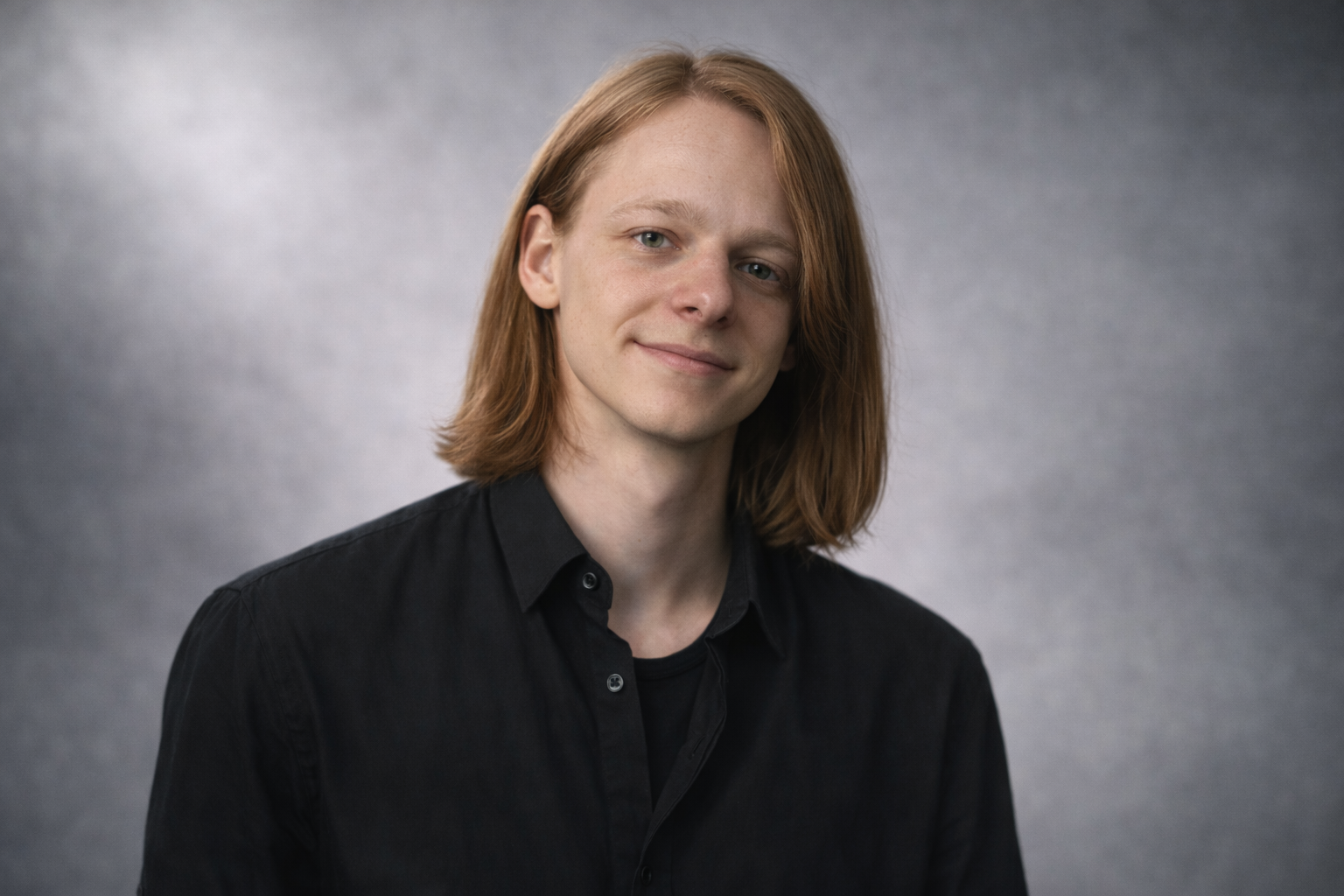
Built by a video editor who got tired of the chaos around the edit.
I am Mario, founder of Nomadic Filmworks. I work at the intersection of video editing, AI workflows, automation and privacy-first infrastructure. Nomadic Video Automation is where these parts meet in one practical system.
I build workflows for people and teams who do not need another random tool. They need a process that makes production clearer, faster, easier to document and easier to trust.
If your video production keeps creating the same friction, we should map it properly.
Send me a short description of your current DaVinci Resolve workflow: where material comes in, where captions or transcripts are created, how review works, what happens after render and where finished files are archived. I will tell you honestly which parts are worth automating, which parts first need better structure and which decisions should stay with the editor.